 01635 581 811
Sharing a storage unit with family members, friends, or business partners is a highly efficient and savvy way to manage space and lower overheads. This approach often provides an ideal cost-saving storage solution, whether you’re splitting the expense of housing bulky seasonal gear or co-archiving important family possessions. While the financial benefits are clear, managing shared storage access requires a thoughtful, technology-backed strategy that ensures security and maintains good relationships.
By pairing a trusted storage facility with the right digital tools, you can manage access seamlessly, ensuring everyone only enters the unit when they need to. Modern remote access control systems mean you don’t have to rely on complicated key handoffs or worry about lost physical keys ever again.
The Practical Case for Shared Storage Solutions
Shared storage arrangements are rapidly growing in popularity, driven by the dual need for flexibility and affordability in UK households and businesses. A secure unit acts as a neutral ground where multiple parties can deposit and retrieve items without cluttering their homes or offices. This flexibility is what makes these arrangements so appealing for many different scenarios.
When Sharing Makes Financial Sense
Dividing the monthly unit fee instantly makes storage more affordable for everyone involved. For instance, two flat-sharing friends might use personal storage to declutter their apartment, splitting the unit cost to store excess furniture or sports equipment. For small businesses, sharing a larger unit with a complementary firm – perhaps a baker and a wedding planner storing equipment – can turn an otherwise expensive commitment into a manageable operational cost.
Consider the analogy of a bus pass: instead of everyone paying for their own taxi (or their own tiny shed), you all contribute to a single, secure transport system that gets you where you need to be efficiently and cheaply. This collaborative approach maximises the value of every square foot.
Defining Access Needs for Personal and Business Items
Before selecting any technology, define the scope of shared storage access needed. Personal storage arrangements, such as those used by families during a property chain break, might only need temporary access for a few trusted individuals. Conversely, a growing e-commerce company relying on a unit for stock management might need to grant time-sensitive, trackable access to several employees or delivery drivers.
If your requirements lean towards heavy equipment or bulk items, exploring options for container storage might be necessary for accessible ground-level entry. The level of security and the required flexible contracts will significantly influence the type of remote access control you choose. A shared unit containing high-value antiques requires a far more robust keyless entry system than one holding old camping gear.
Essential Technology for Remote Access Control
To achieve smooth, conflict-free shared storage access, you need reliable technology that manages digital authorisation. Fortunately, there are several effective tools available that negate the need for physical keys entirely.
Smart Locks and Keyless Entry Systems
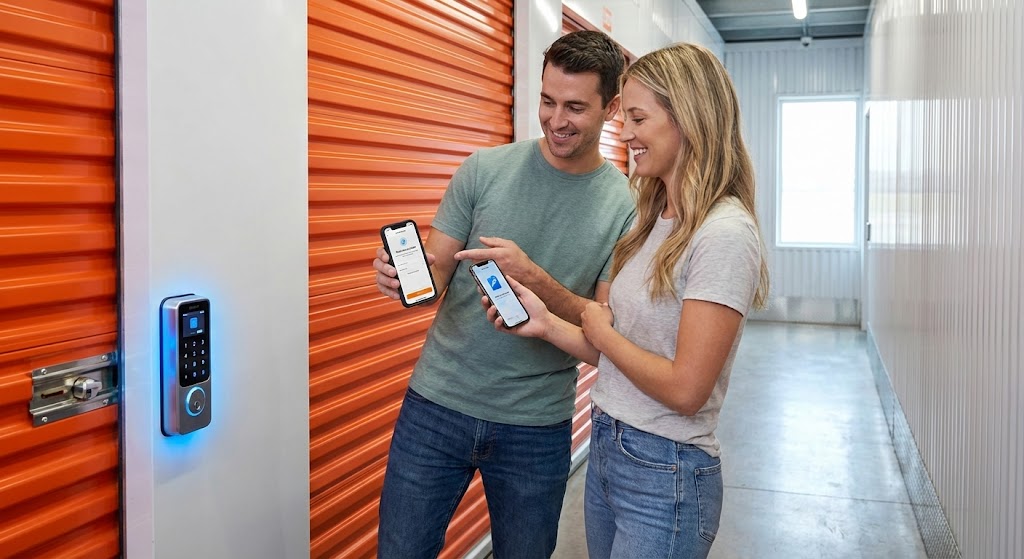
For the highest level of security and control, smart locks are the superior choice. These devices replace the standard padlock on your unit door with a digitally managed system. Remote access control is granted via an app, allowing you to issue virtual keys to specific people from anywhere in the world.
The main advantages of using a smart lock are unparalleled. They offer fully trackable access, meaning you see exactly when someone entered and exited the unit. Furthermore, access permissions can be instantly revoked from anywhere via the app, making them perfect for short-term or temporary sharing arrangements. The drawback is that they generally require batteries and reliable mobile connectivity to function optimally.
The Reliability of Keypad Locks
Keypad locks remain a solid, lower-tech option for managing shared storage access. You establish a unique, multi-digit code, and anyone with that code can open the lock. This method is straightforward, affordable, and requires no complicated apps or smart devices, making it accessible to all users.
However, the security relies entirely on code confidentiality. Once the code is shared, you lose the ability to track who specifically entered the unit or revoke individual access rights instantly. To maintain security, you should regularly change the code, particularly whenever an individual’s need for access expires.
Using Shared Digital Notes for Coordinated Efforts
The simplest layer of digital management involves using shared note-taking apps like Google Keep or Microsoft OneNote. These tools aren’t for the lock itself, but rather for managing the necessary logistics around shared storage access. A shared note can contain:
- The current keypad code or smart lock password.
- A list of items that have been added or removed.
- A clear reminder of unit-specific rules.
- Instructions for coordinating with staff.
This method is free, easily updated, and provides a central point of reference for everyone involved. It helps streamline the process for packing and preparing items, especially when combined with advice on necessary packing materials available locally.
Setting Up Secure Access for Peace of Mind
Implementing the technology is only the first step; maintaining security requires careful management and adherence to best practices. Your goal is to make remote access control convenient without compromising the safety of your possessions.
Best Practices for Code and Password Management
Security protocols should be established immediately upon setting up the unit. If you’re using a smart lock, always activate two-factor authentication (2FA) on the associated app. This prevents unauthorised entry even if a password is stolen. With a keypad, commit to changing the code quarterly or immediately after any person ceases to require access, ensuring only current users retain entry permission.
Never write the code near the unit itself – not on a label, a piece of tape, or even in a “safe” place inside the unit. This common mistake completely defeats the purpose of the security measure.
Facility-Level Security Features You Can Trust
The best shared storage access system integrates with the inherent security of the facility. Choosing a reputable provider like Newbury Self Store means benefiting from comprehensive site security that backs up your chosen padlock technology. You don’t have to manage perimeter security yourself when you rent with a trusted provider.
Look for facilities that offer:
- 24/7 CCTV monitoring across the site.
- Secure gated access with unique electronic fobs or PINs.
- High-level lighting and perimeter fencing.
- Flexible contracts that specify clear terms of use.
This multi-layered approach ensures that even if your individual lock technology is compromised, the items remain protected by the facility’s extensive security infrastructure.
Establishing Communication Protocols for Shared Units
Technology can manage entry, but it can’t manage etiquette. Clear, upfront communication is the single most effective tool for successful shared storage access. Every person involved must know the rules and respect the shared space.
Start by defining clear, written rules. Who is responsible for paying the monthly fee? What kinds of items are prohibited? Should the unit be locked in a specific way upon exit? Documenting these expectations prevents confusion and conflict down the line.
Providing Necessary Tech Training
Recognise that not everyone is digitally fluent. If you’re using a smart lock or a complex shared digital note, dedicate time to walk everyone through the process. Show them how to download the app, activate their virtual key, and troubleshoot simple issues. Don’t assume familiarity; provide quick, concise instructions.
Consider the fictional story of David and his employee, Mark. David set up a smart lock for his business storage for inventory, but simply texted Mark the link. Mark struggled with the app permissions and ended up wasting an hour trying to access stock on a crucial delivery day. A five-minute tutorial from David could have saved the company time and prevented a lost sale.
Coordinating Access and Inventory
Use a simple, shared spreadsheet or the shared digital note to log visits. This simple action means the next person knows exactly whether an item has been removed or stock has been replenished. This coordinated effort is significant for shared business storage where inventory levels change frequently.
If any issues arise or if you need to adjust your unit size or arrangements, our team is always ready to help. If you encounter any problems with the unit itself, you can always contact our staff directly for assistance.
Conclusion and Next Steps
Implementing technology for shared storage access transforms a potentially complicated arrangement into a secure, harmonious system. You’ve got the knowledge to move beyond simple keys and embrace smart, trackable, and manageable remote access control for your personal storage or business needs. By choosing reliable technology and pairing it with clear communication, you ensure a smooth and cost-effective experience for everyone.
Ready to secure a convenient unit in the area and set up your shared system? Modern remote access control solutions make managing multiple users simpler than ever, giving you complete oversight of who enters your unit and when. To take the next steps and get started, get in touch with our team today. You’ll gain peace of mind knowing your valuables are protected by industry-leading security features.