
 01635 581 811
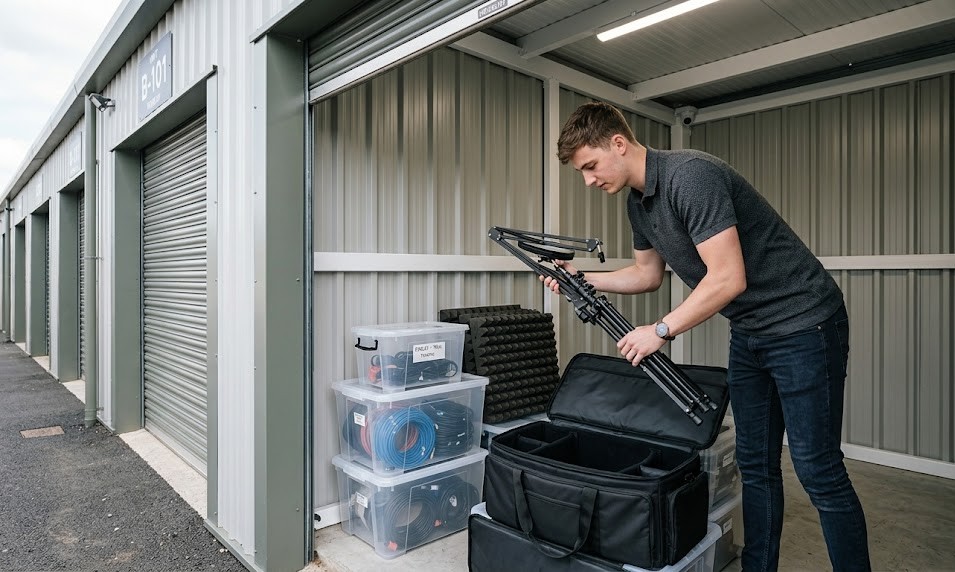
Content creation isn’t cheap. A single camera setup can cost £2,000. Add lighting rigs, microphones, backdrops, props, and editing equipment, and you’re looking at £5,000 to £10,000 worth of kit packed into a spare bedroom or corner of your flat. When you’re filming three times a week and your partner’s asking why there’s a green screen in the living room, storage becomes more than an organisational challenge – it’s a relationship test.
Many YouTubers and podcasters start their channels with minimal gear, but success brings expansion. You upgrade your camera. You buy better lighting. You invest in acoustic panels, multiple microphones for guest interviews, and backup equipment in case something fails mid-shoot. Before you know it, you’ve outgrown your space, and every surface in your home’s covered with cables, tripods, and ring lights.
Dedicated content creator equipment storage solves this problem without forcing you to rent expensive studio space. It protects your investment, keeps your home liveable, and gives you a professional base to manage your growing channel. Here’s how content creators use self-storage to stay organised, protect expensive gear, and scale their operations without turning their homes into equipment warehouses.
Why Content Creators Need Dedicated Equipment Storage
Most content creators don’t need studio space – they need somewhere secure to store the equipment they’re not using right now. You might film in your living room, a rented location, or outdoors, but you still need a place to keep backup cameras, seasonal props, old lighting setups, and archived projects.
Protecting your investment’s the primary reason. A decent camera body costs £1,500. Lenses range from £300 to £2,000. Microphones, audio interfaces, and lighting rigs add thousands more. Leaving this camera equipment in a damp garage or cluttered spare room risks damage from moisture, dust, or accidental knocks. Climate-controlled equipment storage maintains stable temperature and humidity levels, protecting sensitive electronics from condensation and overheating.
Freeing up living space is the second benefit. When your dining table doubles as a packing station for merchandise and your bedroom closet stores backdrops, you’re not living in a home – you’re living in a warehouse. Moving non-essential equipment to storage lets you reclaim your space without abandoning your channel.
Scaling your operation becomes easier with dedicated storage. As your channel grows, you’ll accumulate more gear: multiple camera angles require multiple cameras, professional audio needs backup mics, and brand partnerships often send products for review. Storage gives you room to expand without upgrading your flat or renting commercial space.
Think of it like a chef’s kitchen. You don’t keep every pot, pan, and gadget on the counter – you store what you’re not using and bring it out when needed. Content creators need the same approach: active gear at home, backup and seasonal equipment in storage.
What Equipment Benefits Most from Professional Storage
Not everything needs to be stored off-site. Your primary camera, everyday microphone, and editing laptop stay with you. But certain items benefit significantly from secure, climate-controlled storage.
Backup cameras and lenses top the list. If your main camera fails during a shoot, having a backup saves the day. But you don’t need that backup sitting on your desk collecting dust – store it properly, and it’ll be ready when you need it.
Lighting equipment takes up enormous space. Softboxes, ring lights, LED panels, and light stands are bulky and awkward to store at home. They’re also expensive and fragile, making them ideal candidates for storage where they won’t get knocked over or damaged.
Props and backdrops accumulate quickly. If you run a product review channel, you’ll have dozens of items waiting to be featured. If you create educational content, you might have whiteboards, charts, and demonstration materials. Seasonal creators – those who produce holiday content or outdoor adventure videos – need somewhere to store off-season gear without cluttering their homes.
Audio equipment for podcasters includes multiple microphones, boom arms, pop filters, acoustic panels, and mixing boards. When you’re not recording, this gear needs protection from dust and humidity, both of which can degrade audio quality over time.
Archived projects and hard drives require careful storage. Many content creators keep physical backups of their work on external hard drives. These need to be stored in stable conditions – extreme temperatures and humidity can corrupt data. Climate-controlled units provide the right environment for long-term digital archiving.
Merchandise inventory becomes necessary as channels grow. If you sell branded t-shirts, mugs, or posters, you need somewhere to store stock before it ships. Keeping 200 t-shirts in your flat isn’t practical, but a storage unit gives you a dedicated space to manage merchandise inventory and fulfil orders.
One tech reviewer runs a YouTube channel receiving 15-20 products monthly from brands. He films reviews over two weeks, then stores the items for three months in case he needs to reference them in follow-up videos. After that, he donates or sells them. Without storage, his flat would be overflowing with gadgets he’s already reviewed. The storage unit lets him maintain a professional operation whilst keeping his home liveable.
Choosing the Right Storage Unit Size for Content Creators
Most content creators don’t need a massive unit – they need enough space to store equipment safely without paying for wasted square footage. Here’s how to estimate what you’ll need.
A 25-50 square foot unit suits solo creators with moderate equipment. This accommodates:
- Two to three cameras with lenses
- A full lighting setup (softboxes, stands, and LED panels)
- Audio equipment (microphones, boom arms, and acoustic panels)
- Props and backdrops
- Shelving for smaller items like cables, batteries, and memory cards
A 50-100 square foot unit works for content creators with extensive gear or those managing merchandise inventory. This size fits:
- Multiple camera setups for different shooting styles
- Large props or set pieces (furniture, backdrops, display units)
- Merchandise stock (50-200 units of clothing or products)
- Editing equipment (backup monitors, keyboards, and hard drives)
- Archive boxes for old projects and paperwork
Drive-up access is worth considering if you’re moving heavy equipment regularly. Lighting rigs, camera cases, and boxes of merchandise are easier to load when you can pull up directly to your unit. If you’re only storing smaller items, standard access works fine.
When calculating space, remember that vertical storage maximises capacity. Invest in sturdy shelving units to keep equipment off the floor and organised by category. Label everything clearly – when you need a specific lens or microphone, you don’t want to dig through unmarked boxes.
Organising Your Storage Unit for Quick Access
Content creators need fast access to their equipment. If you’re filming tomorrow and your backup camera’s buried under three boxes of props, you’ve got a problem. Here’s how to organise your unit for maximum efficiency.
Create zones based on how frequently you use items. Active equipment you rotate regularly goes near the front. Seasonal props, archived projects, and backup gear go toward the back. This prevents you from moving half your unit every time you need something.
Invest in clear plastic bins for smaller items. Cables, batteries, memory cards, and adapters disappear in cardboard boxes. Clear bins let you see what’s inside without opening every container. Label each bin with its contents – ‘Camera Accessories’, ‘Audio Cables’, ‘Lighting Filters’ – so you can grab what you need quickly.
Use shelving units to keep equipment off the floor. Metal shelving’s sturdy, affordable, and adjustable. Store heavier items like camera cases on lower shelves and lighter items like backdrops and props on upper shelves. This prevents damage and makes everything visible at a glance.
Keep a digital inventory of what’s in storage. Use a simple spreadsheet or note-taking app to list every item and its location within the unit. When you’re planning a shoot and need to check whether you have a specific lens or microphone, you can reference your inventory instead of driving to the unit.
Protect equipment properly before storing it. Cameras and lenses should be in padded cases. Microphones need foam inserts or protective sleeves. Lighting equipment should be disassembled and stored in original packaging if possible. This prevents scratches, dust buildup, and accidental damage.
One podcaster uses colour-coded bins: blue for audio equipment, red for recording props, green for archived episodes on hard drives. When he needs something, he knows exactly which bin to grab. It’s a simple system, but it saves hours of searching and keeps his workflow running smoothly.
Security and Insurance Considerations for High-Value Equipment
Content creation gear’s expensive, portable, and highly desirable to thieves. A camera, lens, and microphone setup can be resold quickly, making it a prime target. That’s why security and insurance are non-negotiable when storing equipment.
Look for facilities with 24/7 CCTV coverage. Cameras should monitor entry points, hallways, and individual units. Ask whether footage’s recorded and how long it’s retained – this matters if something goes missing and you need to review activity.
Individual unit alarms add another layer of protection. If someone attempts to access your unit without authorisation, the alarm triggers immediately, alerting facility staff and potentially scaring off intruders.
Secure access control ensures only authorised people enter the facility. Pin codes, key fobs, or biometric scanners prevent unauthorised entry. Check whether the facility logs access times – if something goes missing, you’ll want a record of who entered and when.
Insurance is essential. Some facilities offer coverage as part of the rental agreement, but it’s often limited. Check whether your home contents insurance covers items stored off-site. If not, purchase specialist equipment insurance. Given that a single camera body can cost £2,000, the annual premium’s a small price to pay for peace of mind.
Document your equipment before storing it. Photograph each item, note serial numbers, and keep receipts. If you ever need to make an insurance claim, this documentation proves ownership and value.
One YouTuber had £8,000 worth of camera equipment stolen from his car whilst transporting it to a shoot. His insurance covered the loss because he’d documented everything with photos and receipts. Without that proof, he’d have struggled to claim the full value. The incident taught him to treat documentation as seriously as the equipment itself.
Climate Control: Why It Matters for Electronics and Audio Gear
Electronics and moisture don’t mix. Cameras, microphones, and hard drives contain sensitive components that degrade in humid or fluctuating conditions. That’s why climate-controlled storage’s worth the extra cost for content creators.
Humidity’s the primary threat. When moisture seeps into camera bodies, it causes condensation on internal components, leading to corrosion and malfunction. Lenses develop fungus in damp conditions, which spreads across the glass and ruins image quality. Audio equipment suffers similar damage – moisture corrodes circuitry and degrades sound quality.
Temperature fluctuations cause expansion and contraction in electronic components. Over time, this weakens solder joints and connections, leading to intermittent failures or complete breakdowns. Hard drives are particularly vulnerable – extreme temperatures can corrupt data or cause mechanical failure.
Climate-controlled units maintain stable temperature and humidity levels year-round. This protects your equipment from the damp cold of winter and the stifling heat of summer. It’s especially important in the UK, where weather swings between wet and mild regularly.
Dust control’s another benefit. Climate-controlled units are typically better sealed than standard units, reducing dust infiltration. Dust clogs camera sensors, scratches lenses, and degrades audio quality. Keeping your equipment in a clean, controlled environment extends its lifespan significantly.
Think of it like storing wine. You wouldn’t leave expensive bottles in a garage where temperatures swing from freezing to sweltering. The same logic applies to your equipment – invest in proper conditions, and your gear will perform reliably for years.
Balancing Storage Costs with Studio Rental
Some creators wonder whether renting studio space makes more sense than using storage. The answer depends on how you work.
Studio space costs significantly more – £500 to £1,500 per month in most cities – but includes shooting space, lighting, and sometimes editing facilities. If you film daily and need a dedicated environment, a studio might justify the expense.
Storage costs £50 to £150 per month for a unit large enough to hold equipment and merchandise. You still film at home or on location, but you’ve got a secure base for gear you’re not using right now. For most creators, this is the more cost-effective option.
Consider your workflow. If you film once or twice a week, you don’t need a studio sitting empty the rest of the time. Store your equipment, set up at home when you’re filming, and pack it away afterward. You’ll save thousands annually compared to renting studio space.
If you’re collaborating with other creators or hosting guest interviews regularly, a studio becomes more attractive. But for solo creators or small teams, personal storage offers flexibility without the overhead.
One creator rents studio space for one day per month to batch-record content, then stores his equipment the rest of the time. This hybrid approach gives him access to professional facilities without paying full-time studio rates. It’s proof that smart storage planning can achieve professional results on a modest budget.
Practical Tips for Content Creators Using Self-Storage
Here are some field-tested strategies to make storage work seamlessly for your content creation workflow.
Schedule regular access times. If you visit your unit every Tuesday to swap equipment or restock merchandise, you’ll develop a routine that keeps you organised. Sporadic visits lead to forgotten items and disorganisation.
Keep a ‘grab bag’ at home. Store your most-used equipment – primary camera, everyday microphone, essential cables – at home. Use storage for backups, seasonal gear, and archived projects. This minimises trips to the unit whilst keeping your home clutter-free.
Label everything obsessively. When you’re packing equipment after a shoot, it’s tempting to throw everything in boxes and sort it later. Don’t. Label each box with its contents and the date you stored it. Future you will be grateful.
Rotate merchandise regularly. If you’re selling branded products, check your merchandise inventory monthly. Restock popular items, clear out slow sellers, and keep track of what’s moving. This prevents you from discovering you’re out of stock when someone places an order.
Use cable organisers. Cables are the bane of every content creator’s existence. Use velcro ties, cable bags, or labelled zip-lock bags to keep them untangled and easy to identify. Store them in a dedicated bin near the front of your unit.
Plan for growth. If your channel’s growing, you’ll accumulate more equipment. Rent a unit slightly larger than you need right now to avoid upgrading in six months. The extra space costs less than moving twice.
Protect against pests. Even clean storage facilities can have occasional pest issues. Don’t store food or anything that might attract rodents. If you’re storing fabric backdrops or props, consider using sealed plastic bins instead of cardboard boxes.
Making Storage Part of Your Content Creation Workflow
The most successful content creators treat storage as part of their production process, not an afterthought. Here’s how to integrate it seamlessly.
Pre-production planning: When you’re planning a shoot, check your storage inventory to see what equipment and props you have available. This prevents last-minute scrambles and ensures you’re using your resources efficiently.
Post-production archiving: After you’ve edited and published a video, archive the project files and any physical props or products used in the shoot. Store hard drives in your unit and label them clearly. This keeps your workspace clear and your archives organised.
Merchandise management: If you sell products, treat your storage unit like a mini-warehouse. Keep inventory spreadsheets updated, restock regularly, and set aside time each week to fulfil orders. This professionalises your operation and prevents stockouts.
Equipment maintenance: Schedule quarterly equipment checks. Visit your unit, inspect cameras and lenses for dust or moisture, test audio gear, and replace batteries in anything that needs them. This prevents discovering broken equipment when you need it most.
Seasonal content preparation: If you create holiday or seasonal content, prepare months in advance. Store props, backdrops, and themed equipment in your unit, then retrieve them when it’s time to film. This spreads out the workload and ensures you’re ready when the season arrives.
Think of your storage unit as the backstage area of a theatre. The audience sees the polished performance, but behind the scenes, there’s a well-organised system managing props, costumes, and equipment. Your viewers see the finished video – your storage unit’s where the magic gets organised.
Scaling Your Channel Without Outgrowing Your Space
Growth’s exciting, but it brings logistical challenges. More subscribers mean more content, more equipment, and more merchandise. Here’s how storage helps you scale without chaos.
Upgrade your unit as needed. If you’ve outgrown a 25 square foot unit, move to a 50 square foot space. Facilities offer flexible contracts, so you’re not locked into a size that no longer fits your needs.
Separate active and archived projects. As your back catalogue grows, you’ll accumulate terabytes of footage and project files. Store archived hard drives in your unit, keeping only active projects on your editing computer. This frees up workspace and protects your archive.
Consider container storage for bulk merchandise. If you’re selling hundreds of products monthly, container storage offers drive-up access and ample space for inventory. You can load and unload directly from your vehicle, streamlining fulfilment.
Invest in proper packing materials. As you move equipment in and out of storage, protect it with quality packing supplies. Bubble wrap, foam inserts, and sturdy boxes prevent damage during transport.
Collaborate with other creators. Some content creators share storage units to split costs. If you know another YouTuber or podcaster who needs space, consider co-renting a larger unit. Just establish clear boundaries and organisation systems to avoid conflicts.
Building Your Creator Business
Content creation demands significant investment in equipment, and protecting that investment requires more than shoving cameras in a cupboard. Dedicated storage gives you a secure, climate-controlled base to manage your gear, merchandise, and archived projects without turning your home into a warehouse.
Whether you’re a solo YouTuber upgrading your setup, a podcaster managing multiple microphones and acoustic panels, or a growing channel selling merchandise, storage solves the space problem without forcing you into expensive studio rentals. It protects your equipment from damage, keeps your workflow organised, and scales with your channel as it grows.
The key’s treating storage as part of your production process – not an afterthought, but a strategic tool that makes your operation more professional and efficient. With proper organisation, security, and climate control, your storage unit becomes the backstage area that supports your on-screen success.
Business storage designed for commercial operations works particularly well for content creators treating their channels as serious businesses. You get the security features, climate control, and flexible access that professional creators need, without the premium costs of dedicated studio space.
Newbury Self Store understands that content creators need more than just empty space. You need facilities where expensive camera equipment stays protected, lighting rigs remain secure, and your entire production operation can scale without cluttering your home. We know that your equipment isn’t just gear – it’s your livelihood and your creative tools.
If you’re ready to reclaim your living space and protect your equipment properly, contact us to discuss unit options that fit your workflow and budget. Your gear deserves better than a cluttered spare room – give it the dedicated space it needs to keep your channel running smoothly.