
 01635 581 811
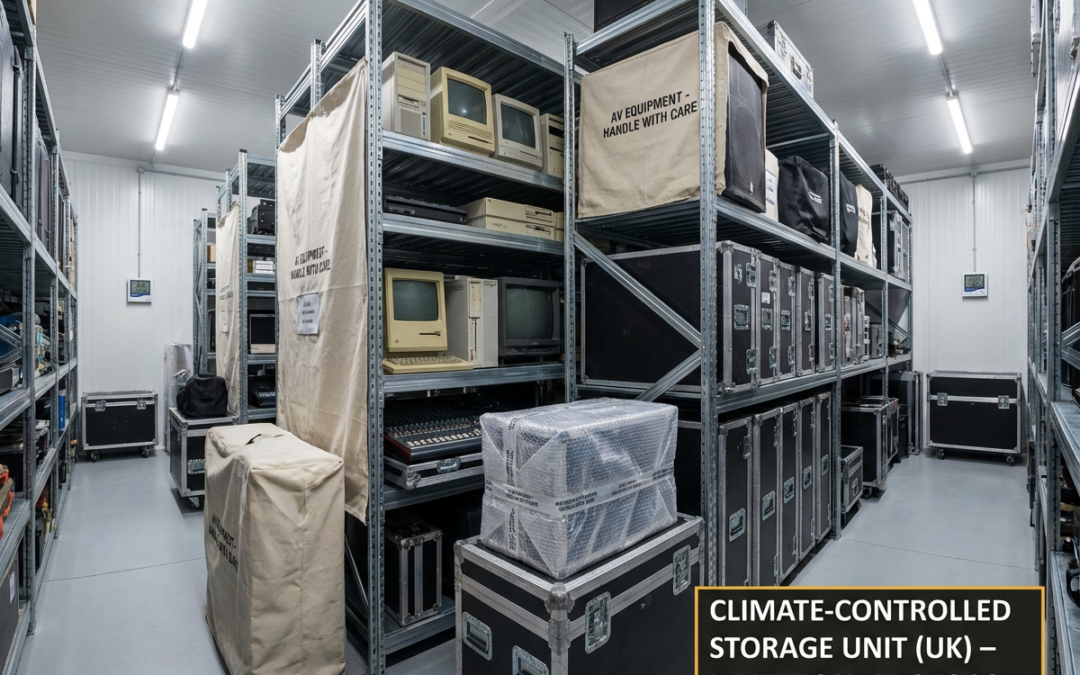
In our modern lives, electronics are absolutely central. From essential work laptops and home computers to entertainment systems and cherished gadgets, these devices carry immense value, both financially and personally. When circumstances require you to place these items into storage, perhaps during a house move, a decluttering phase, or for business inventory management, ensuring their safety is paramount. The prospect of discovering damage upon retrieval is something everyone wants to avoid.
Fortunately, effectively Storing Electronics in a self storage unit is entirely achievable with the right knowledge and preparation. The goal is comprehensive Electronics Damage Prevention, and it begins long before the items reach the unit. Here at Newbury Self Store, we’re dedicated to providing not just space, but also the guidance our customers need to protect their belongings. This detailed guide will walk you through every step to ensure your technology remains in perfect working order.
Understanding the Risks: Why Your Gadgets Need Special Care in Storage
Electronics might appear sturdy, but their internal components are often delicate and susceptible to various environmental factors. Acknowledging these potential hazards is the first step towards effective protection.
The Common Culprits: What Can Harm Your Electronics?
Let’s identify the primary threats your electronics could face in a storage environment if not properly managed.
The Perils of Temperature Extremes and Fluctuations
Significant temperature changes are detrimental. High heat can cause plastic components to warp, degrade internal parts, and reduce battery longevity. Extreme cold, on the other hand, can make plastics brittle. More critically, moving electronics from a cold environment to a warmer one can cause condensation to form internally, leading to potential short circuits. Rapid and frequent temperature shifts are particularly stressful for electronic components.
Humidity Issues: A Silent Threat to Circuits
Excessive moisture in the air is a major adversary. High humidity levels can result in condensation, which in turn can corrode metal contacts, circuit board traces, and other sensitive parts. Over time, this corrosion can lead to malfunctions or complete failure. Mould growth, encouraged by damp conditions, can also pose a problem.
Dust Accumulation: The Slow Path to Malfunction
While seemingly minor, dust can cause significant issues over extended periods. It can infiltrate casings, settle on components, block cooling fans (leading to overheating), and interfere with electrical connections. A build-up of dust acts as an insulator, preventing heat from dissipating effectively.
Static Electricity: An Invisible Danger
Electrostatic discharge (ESD), that small spark you might occasionally experience, can be catastrophic for the micro-circuitry within your electronics. Sensitive components like processors and memory modules are particularly vulnerable to damage from even low levels of static electricity.
Uninvited Guests: The Problem with Pests
A well-maintained storage facility will minimise this risk, but it’s worth noting that pests like rodents or insects can cause severe damage if they gain access. They might chew through wiring, build nests within equipment, or leave behind corrosive waste.
Avoiding Knocks and Bumps: Physical Damage Concerns
This is perhaps the most straightforward risk but one that requires careful attention. Accidental drops, items shifting during transit, or the pressure from improperly stacked heavy objects can cause cracked screens, dented casings, or dislodge internal components.
Essential Pre-Storage Steps for your electronics: Laying the Groundwork for Safety
Diligent preparation is the cornerstone of safely Storing Electronics. These initial steps are crucial for long-term preservation.
The Cardinal Rule: Always Back Up Your Data
Before any other preparation, ensure all data stored on your devices is securely backed up. This is your ultimate safety net against unforeseen issues. Data loss is often more devastating than the loss of the hardware itself.
Utilising Cloud Storage Solutions
Online backup services such as iCloud, Google Drive, or Dropbox provide an excellent method for safeguarding your files. Cloud storage keeps your data accessible from any internet-connected device and protects it from physical hazards that might affect the storage unit.
The Role of External Hard Drives and Physical Backups
For substantial data volumes, like extensive media libraries or comprehensive archives, an external hard drive offers a practical backup solution. Once backed up, this drive should also be packed with care and stored safely , consider storing it separately if possible, or at least ensuring it receives the same level of protection as your other electronics.
Cleanliness is Key: Preparing Your Devices
Storing electronics that are already dirty can exacerbate potential problems. Dust and grime can attract moisture or encourage pest activity.
Proper Techniques for Wiping Down Electronics
Use a soft, lint-free microfibre cloth. If necessary, lightly dampen it with distilled water or a cleaner specifically designed for electronics , never spray liquids directly onto any device. Pay particular attention to screens, ensuring you use appropriate screen-safe cleaning solutions.
Using Compressed Air for Hard-to-Reach Areas
Compressed air is invaluable for removing dust from keyboards, cooling vents, ports, and other crevices. Use it in short, controlled bursts, keeping the can upright to prevent propellants from spraying out as liquid.
The Advantage of Original Packaging for Storing Electronics
If you have retained the original boxes and protective inserts for your electronics, you are at an advantage. This packaging is custom-designed to cradle the device securely, offering optimal protection against movement and impact during Storing Electronics.
Powering Down and Managing Accessories
Properly managing power sources and accessories is vital for long-term storage.
Why Battery Removal is Often Crucial
Whenever feasible, remove batteries from devices like remote controls, wireless peripherals, and older laptops with user-replaceable batteries. Batteries left in situ for long periods can leak, leading to corrosive damage that can ruin the device. For devices with non-removable batteries (e.g., smartphones, modern tablets), ensure they are fully powered off and ideally store them with a battery charge of around 40-50%, which is generally considered optimal for long-term battery health.
Organising Cables and Peripherals Effectively
A tangle of cables is a common frustration. Before packing, unplug all cables from your devices. Coil them neatly, avoiding tight folds that could damage internal wires, and secure them with Velcro ties or cable organisers. Labelling each cable to identify its corresponding device will save considerable time and effort when you eventually set everything up again.
Professional Packing Techniques: Your Guide to creating a protective environment for storing electronics
Once your electronics are clean, backed up, and prepared, the next stage is to pack them meticulously. This creates a protective barrier against potential hazards.
Anti-Static Precautions: Your Primary Defence
Given the risk of ESD, taking anti-static measures is a prudent step, especially for sensitive components.
The Importance of Anti-Static Bags and Materials
For items like internal computer components (graphics cards, RAM) or any particularly sensitive devices, enclosing them in anti-static bags before adding other cushioning is highly recommended. Anti-static bubble wrap is also available and provides dual protection. These materials are designed to dissipate static charges safely.
Effective Cushioning: Ensuring a Soft Journey
Generous cushioning is essential to absorb shocks and prevent movement within boxes.
Leveraging Bubble Wrap for Optimal Protection
Wrap each electronic item thoroughly with bubble wrap (anti-static, if possible). Pay extra attention to vulnerable areas like screens or delicate protruding parts. Secure the bubble wrap with packing tape. For large screens (TVs, monitors), placing a layer of thin foam sheeting directly against the screen surface before applying bubble wrap can offer additional protection against scratches.
Selecting Appropriate Void Fill: Packing Peanuts and Foam
After placing a wrapped item in a box, fill any empty spaces to immobilise it. While packing peanuts can be used, be aware that standard versions can generate static; anti-static peanuts are a better choice. Custom-cut foam inserts provide excellent, stable support. Generous amounts of crumpled packing paper can also serve as effective void fill. The aim is to ensure the contents cannot shift if the box is moved.
Using Soft Linens for Additional Padding
Clean, completely dry towels, blankets, or old clothing can be used as supplementary padding. These are useful for wrapping less sensitive items or filling larger gaps within boxes. Ensure any fabric used is thoroughly dry to prevent moisture introduction.
Choosing the Right Containers for Secure Storage
The box itself is the first line of physical defence for your electronics.
The Necessity of Strong, Good-Quality Boxes
Avoid using old, weak, or damaged boxes. Invest in new, sturdy cardboard boxes, preferably double-walled for heavier or more valuable electronics. The box should be of an appropriate size for the item , not so large that it requires an excessive amount of fill, nor so small that it puts pressure on the contents. You can find a selection of robust Packaging materials, including suitable boxes, at Newbury Self Store; these are designed to offer reliable protection for your belongings.
Opting for Plastic Bins for Enhanced Electronics Damage Prevention
For superior protection, particularly against moisture, dust, and potential crushing, consider using durable plastic storage bins with well-fitting, sealable lids. These represent a greater initial outlay than cardboard boxes but offer excellent long-term Electronics Damage Prevention, especially in varied conditions.
Sealing and Labelling: Essential Finishing Touches
Proper sealing and clear labelling are vital for protection and organisation.
The Importance of High-Quality Packing Tape
Use strong, reliable packing tape to thoroughly seal all box seams and edges. This helps to keep out dust, moisture, and pests, and ensures the box maintains its structural integrity.
Clear and Informative Labelling Practices
Label every box clearly and comprehensively. Include a general list of contents (e.g., “Office Computer Tower & Keyboard,” “Living Room Hi-Fi System”), mark it prominently as “FRAGILE,” and indicate “THIS WAY UP” with arrows. This information assists anyone handling the boxes and makes locating specific items much easier later.
Selecting the Ideal Storage Unit: Key Considerations for Your Electronics
The storage unit itself is a critical component of your electronics protection strategy. Not all storage environments are the same.
Climate-Controlled Storage: Is It a Necessity for electronics damage prevention?
This is a frequent and important question when planning for Storing Electronics. Climate-controlled units are designed to maintain a relatively stable temperature and humidity level.
How Climate Control Protects Your Valuables
By regulating the internal atmosphere, climate-controlled units significantly mitigate the risks posed by extreme temperatures and high humidity. This helps prevent condensation, reduces the likelihood of corrosion, and protects against heat or cold-induced damage. For valuable, sensitive, or irreplaceable electronics, or for storage durations exceeding a few months, a climate-controlled unit is strongly recommended for optimal Electronics Damage Prevention.
Assessing When Standard Units Are Sufficient
For less sensitive, older electronics being stored for a very short period during mild weather conditions, a standard unit in a well-maintained facility might suffice. However, given the UK’s often unpredictable climate, if there is any doubt, or for items of significant value, opting for climate control is the safer approach. The team at Newbury Self Store can discuss your items and storage duration to help you choose the most appropriate unit type.
Security Features: Ensuring Peace of Mind
The security of your stored electronics is a primary concern.
Key Security Measures at Newbury Self Store: CCTV, Alarms, and Controlled Access
A reputable storage facility should offer robust security. Look for features such as comprehensive CCTV surveillance, good lighting, secure perimeter fencing, individual unit alarm options, and controlled electronic access systems. At Newbury Self Store, we prioritise the security of your belongings, implementing multiple measures to create a protected environment.
The Importance of a Clean and Pest-Free Facility
Before renting a unit, it’s advisable to assess the overall cleanliness and maintenance standards of the facility. A clean environment is less likely to harbour dust, dampness, or pests. Enquire about their pest control protocols.
Unit Accessibility: Accessing Your Stored Items
Consider your potential need to access the stored electronics during the storage period.
Matching Access Hours to Your Needs
Storage facilities have varying access hours. Ensure these align with your potential requirements. Some offer extended or 24/7 access, while others have more standard operating hours.
Convenient Access at Newbury Self Store
We strive to offer convenient access, allowing our customers to reach their units when necessary. For details regarding our specific access arrangements and location, you can find information on our Contact Section.
Strategic Placement Within Your Unit: Optimising for Safety and Longevity
The way you arrange your packed boxes within the storage unit can further enhance the safety of your electronics.
Elevation and Protection: Keeping Items Off the Ground
It is crucial to avoid placing boxes containing electronics directly onto concrete floors. Concrete can be cold and may transfer moisture. Use wooden pallets, plastic sheeting, or even spare timber planks to create a raised platform, elevating your boxes by a few inches.
The Importance of Air Circulation Around Your Boxes
Avoid packing boxes too tightly against each other or against the unit walls. Leaving small gaps allows for air to circulate, which can help to moderate temperature and humidity within the unit and reduce the risk of condensation or mould, particularly in units without climate control.
Weight Distribution: Heavier Items Below, Lighter Items Above
Adhere to the standard principle of stacking: heavier, more robust boxes should form the base of any stacks. Lighter boxes, particularly those containing fragile electronics like monitors or laptops, must always be placed on top. Never position heavy items on boxes marked “Fragile” or known to contain delicate equipment.
Safe Positioning: Shielding Sensitive Electronics from Potential Risks
Consider the placement of your most valuable electronics within the unit. Ideally, position them towards the centre of your stored goods, away from the door (which may experience more direct temperature changes) and away from exterior walls if applicable. Ensure any items that could potentially leak (even if well-sealed) are stored well away from, and never above, your electronics.
Long-Term Considerations: Checking on Your Stored Electronics
If your electronics are to be stored for an extended period, you might wonder about the need for interim checks.
The Question of Periodic Inspections
For short-term storage (a few weeks to a couple of months), especially in a climate-controlled unit with meticulous packing, checks are unlikely to be necessary. However, for storage durations extending to many months or years, an occasional inspection, if practical, can offer valuable peace of mind.
What to Look For During a Check-Up for sustained electronics damage prevention
If you conduct a check, look for:
- Signs of Pests: Any evidence of droppings or damage to boxes.
- Dampness: Any musty odours or boxes that feel damp to the touch.
- Integrity of Stacking: Ensure boxes haven’t shifted or started to compress. A brief visual check every few months during long-term storage can help identify and address any emerging issues for sustained Electronics Damage Prevention.
Retrieving Your Technology: Ensuring a Smooth Transition Out of Storage
When it’s time to retrieve your electronics, a few precautions will ensure they are ready for use.
The Crucial Step of Acclimatisation
This is extremely important. If there’s a significant temperature difference between the storage unit and the environment where the electronics will be used, allow them to acclimatise for several hours (ideally 12-24 hours for larger items) at room temperature before plugging them in or attempting to power them on. This allows any potential internal condensation due to temperature change to evaporate safely.
Conducting a Thorough Inspection Before Powering On
As you unpack, visually inspect each item. Look for any signs of physical damage, dust, moisture, or pest activity. Check cables and connectors for integrity.
The Process of Safely Powering Up and Testing Devices
Once acclimatised and inspected, connect your devices and power them up individually. Test their main functions to confirm they are operating correctly. If you encounter any problems, it may be prudent to consult a qualified technician before further use.
Newbury Self Store: Your Ally in Safeguarding Valuable Electronics
At Newbury Self Store, we recognise the importance and value of the items our customers entrust to us. We are committed to providing secure, clean, and accessible storage options to meet diverse needs.
Exploring Our Personal Storage and Business Storage Solutions for Electronics
Whether you need to store a home computer system, extensive audiovisual equipment, or vital business IT hardware, our Personal Storage solutions offer a variety of unit sizes suitable for household electronics, ensuring they are kept securely. For commercial clients, our Business Storage facilities can accommodate larger quantities of office technology and inventory. We can advise on whether our climate-controlled options or standard units best suit your specific electronics and storage duration. For an excellent combination of protection, consider using our specialist Packaging materials, such as anti-static wraps and sturdy boxes, within one of our secure Personal Storage units; this pairing provides a robust defence against environmental factors and physical damage for your valuable electronics.
Essential Packaging Supplies Available to Protect Your Gear
To assist with your packing, we offer a convenient range of high-quality Packaging supplies directly at our facility. This includes various sizes of strong boxes, bubble wrap, packing tape, and protective covers, all designed to help you pack your electronics effectively and securely. Having these supplies readily available simplifies your preparation process.
Is Container Storage Suitable for Electronics? A Considered Approach.
While our indoor storage units, particularly the climate-controlled ones, are generally the preferred choice for delicate electronics, some customers may inquire about our Container Storage options. These units provide excellent, spacious, drive-up access. However, it’s important to understand that the internal environment of a container unit will more closely reflect external ambient conditions. For very robust, thoroughly packed electronics that are less sensitive to temperature and humidity changes, or for shorter-term storage where these factors are less critical, container storage might be considered. We always recommend a detailed discussion about the specific nature of the electronics you intend to store to ensure this option aligns with your needs for Electronics Damage Prevention. For most high-value or environmentally sensitive tech, an indoor unit offers a more controlled environment.
Store Your Electronics with Confidence: Smart Preparation is Key
Your electronic devices are significant investments and integral to daily life and business. Investing time in their correct preparation and storage is a prudent measure to protect their value and functionality. By adhering to these guidelines, you can dramatically reduce the risks associated with Storing Electronics and ensure they are in good working order when you need them again.
If you’re seeking a secure and reliable place for your electronics, the team at Newbury Self Store is ready to assist. We can help you select the ideal storage solution and provide advice to ensure your experience is straightforward and successful. You can learn more about our comprehensive storage services on our Newbury Self Store, or for specific enquiries and personalised advice, please reach out via our Contact Section. We are here to help you safeguard your technology.